Remove unnecessary entries in your system registry
Every PC owner faces the problem of slow computer syndrome at some stage and one of the most common causes of this frustrating issue is the Windows registry. RegCleaner can help remedy annoying registry problems that are slowing down your PC.
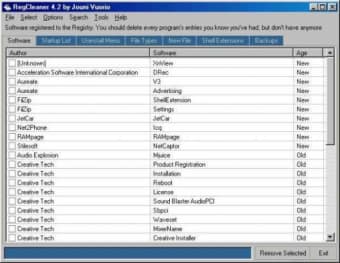
RegCleaner is a small program that displays the data that holds your Operating System together. It does so using the raw values and as such, some of the entries may seem mystical to anyone that doesn’t have much experience of the Windows registry. For users who do know their way around, however, they will find this utility to be efficient and useful for weeding out any lingering entries such as unused file types, “dead” uninstall information, or unwanted startup services.
There is an automatic scan but it seems to be geared towards manual removal of entries. Good for quickly removing multiple keys, the lack of a confirmation dialog could lead to disaster, but as you work through various lists, everything you affect is backed-up, should you accidentally get trigger-happy.
We like the no-nonsense interface of RegCleaner, which suits users who have clear objectives in mind before opening the program. Conversely, if you aren’t confident around the registry, don’t expect any spoon-feeding from here. For that, you may want to look to alternatives such as Registry Repair or Registry Booster.
Overall, RegCleaner is a handy tool for all those that are plagued by registry problems and slow downs.
RegCleaner is an easy to use program. With RegCleaner you can easily get rid of those old and obsolete registry entries created by software that you deleted ages ago.
Key Features:
Remove file types
Remove entries of old software
Uninstall and remove Software from the Add/Remove list
Should be obsolete by now, but way much better than newer registry cleaners. was using this software a few years back and got rid of the installer after plenty of OS and hardware upgrades, never thought i would find this quite useful than the other latest registry cleaners and had to download again. even without update, kudos to "Verkkotieto" the developer for this software, still outperforms recent registry cleaners even the ones that you have to pay for, this one's for free and supposed to be obsolete by now but i can't seem to find a better replacement for it. it does prove why softonic rated this software a "+9" Pros: direct for its purpose and no extra ads and styles Cons: update maybe? but still works fine for me.
Anonymous user
Too afraid this cleaner will ruin my computer. I may be good with computers, but, unless I can find one that is A user friendly and B won't mess up my computer, I will mot be downloading any.
Anonymous user
Simple and easy to use. i have used it for several times, in one words,easy and simple to use for me, and it only takes tiny little room in your computer. Pros: simple and easy Cons: For the people who need a GIANT multifunctional Regcleaner i recommend AthTek Registrycleaner.its function includes all that you know almostly.
Anonymous user
I absolutely LOVE RegCleaner!! . I accidentally removed a crucial folder and Firefox was GONE. Not matter what I tried, I could not get it back...Until I ran RegCleaner! Afterward I was able to reinstall flawlessly!Thank You!!! Pros: Gets to the very roots of problemsLimits the time one spends "trial and error-ing"FREE!! Cons: none so far
Anonymous user
Great Tool. I am an IT Professional and I know Regedit quite well and have used it for many years to keep my Registry Clean. Therefore, I have the ability to compare what I would have painstakingly done in Regedit to what this app does - and RegClean is not damaging to your PC at all and does a very good job of cleaning your Registry. If this app damaged your PC in any way, it's more than likely because it wasn't used correctly. I now use RegCleaner and it is quicker and easier than digging into Regedit. I do wonder why people write reviews, however, not about the product itself but about their opinion of the product type. I would suggest that if you have actually used the product, then please do share your review. But if you just don't personally like Registry Cleaners, this is NOT the place to tout your opinion. Pros: QuickEasyReliable
Anonymous user
RegCleaner...Know what you're deleting...Sir Zig. As with any registry cleaner it really is USER BEWARE; especially if you are a novice and you're not exactly sure what you're deleting from the registry. Registry cleaners can render your machine in-operable, so always tread with caution and seek expert advice before deleting. The gains achieved by these cleaners is debatable. Whatever; just don't go deleting registrty entries willy-nilly because you might be very unhappy at the end of the clean. Do your homework before attempting to use any registry cleaner and, if so tempted, go for one that is not too aggressive in it's approach. Pros: Debatable... Cons: Debatable...
Laws concerning the use of this software vary from country to country. We do not encourage or condone the use of this program if it is in violation of these laws. Softonic may receive a referral fee if you click or buy any of the products featured here.